Modern Image Editor and Viewer
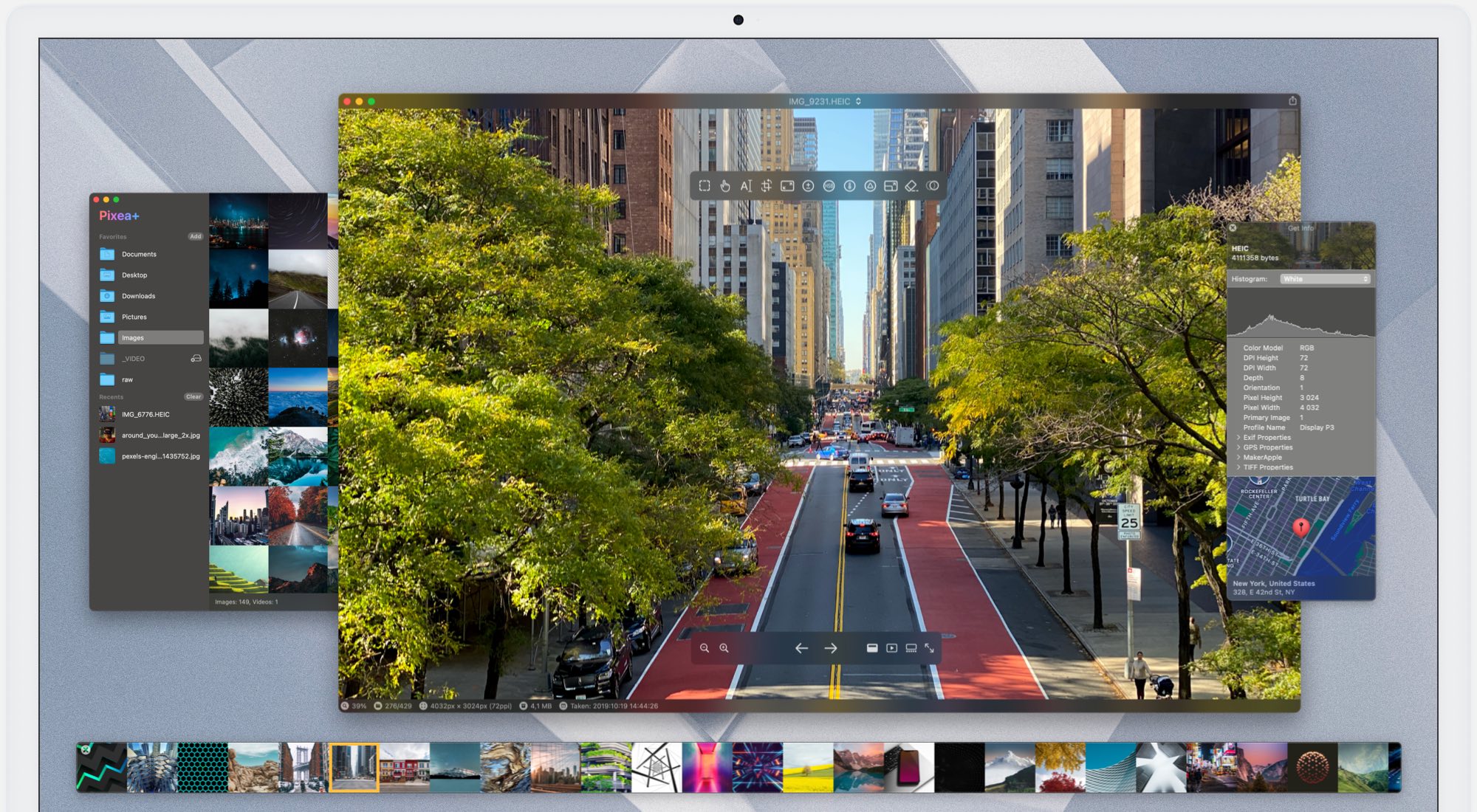
Pixea is a modern image editor & media viewer for macOS, featuring a clean, minimal interface.
Pixea works great with HEIC, JPEG XL, AVIF, PSD, RAW, WEBP, MKV, MP4, and many other formats. Enjoy the all-new way to browse media folders, photo libraries, and archives. Search, filter, sort, or shuffle your media files, then enhance them with precise adjustments and intelligent tools. All in one streamlined app.
Made for Photographers
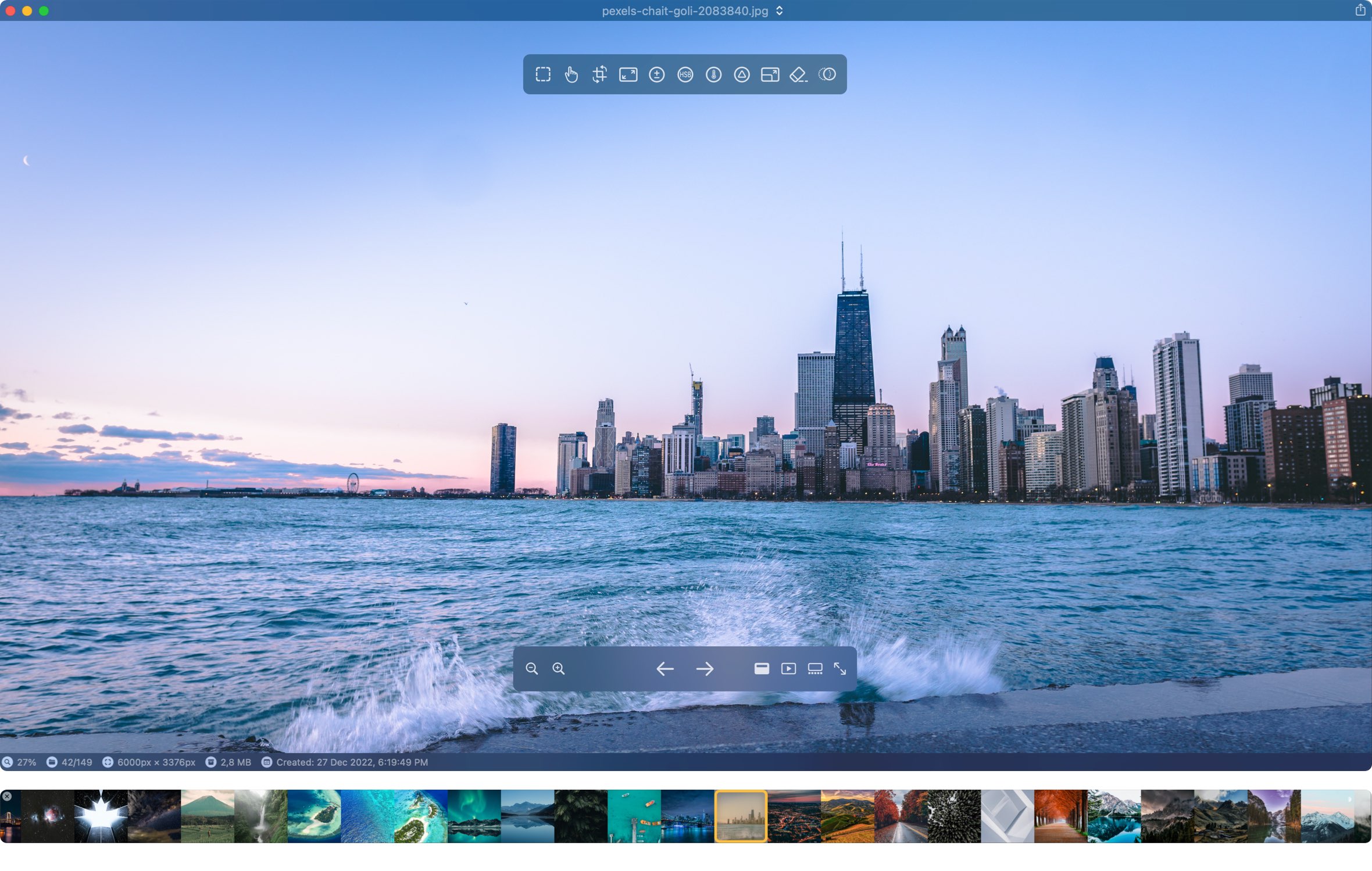
Pixea combines a fast, versatile image viewer with a powerful photo editor, bringing browsing, comparing, organizing, and editing together in one native macOS app. Explore large photo collections, inspect images in detail, apply professional adjustments, batch-process entire folders, and convert between formats — all without interrupting your workflow or juggling separate tools. From the first preview to the final export, Pixea keeps everything you need in one place.
Spend less time editing and more time behind the camera. Pixea brings together powerful adjustments with intelligent depth-aware editing to simplify tasks that would otherwise require painstaking manual work. Brighten your subject without changing the background, enhance distant landscapes without affecting the foreground, or fine-tune color and contrast across different depth regions — all without manually creating masks. Combine these capabilities with selective color adjustments, LUTs, curves, and other advanced tools to achieve your desired look in fewer steps. Whether you're refining a single shot or processing an entire collection, Pixea gives you the tools to work faster, maintain consistency, and focus on the creative decisions that matter.
Precision Editing. Simplified
Full control over light, color, and detail in a clean interface
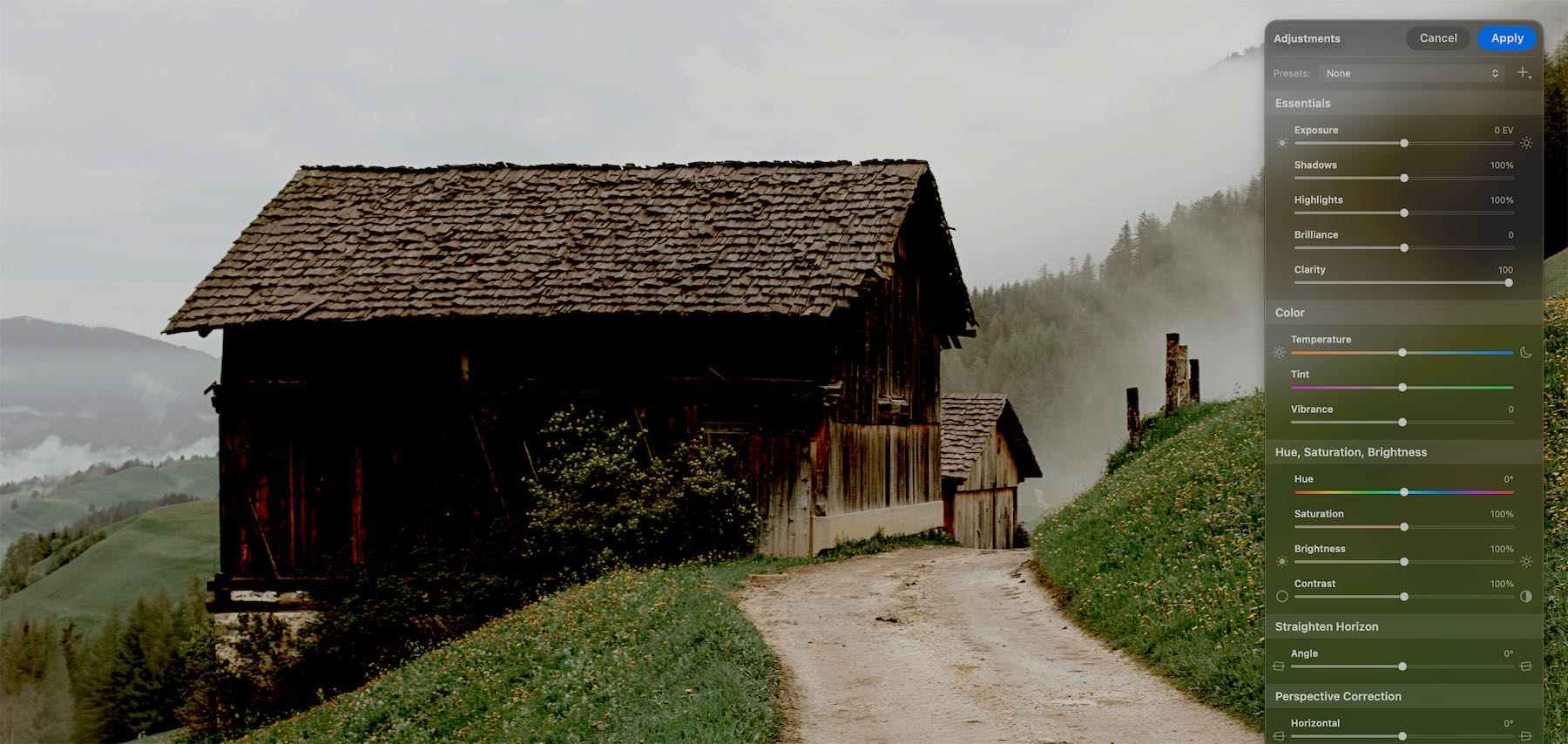
- Adjust exposure, brilliance, clarity, contrast, hue, saturation, brightness, temperature, and tint
- Apply LUT filters, tweak color curves, and adjust HSL per channel
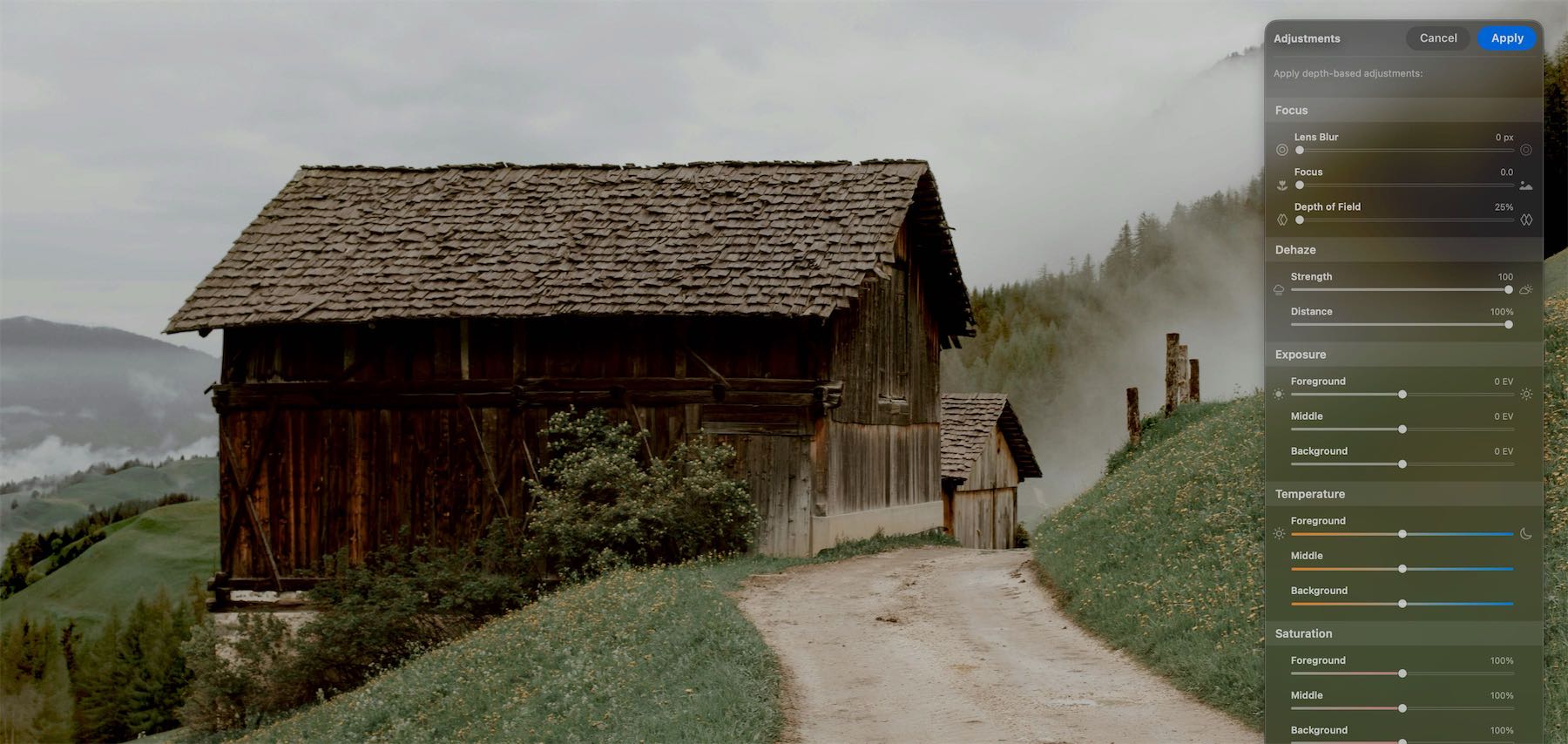
- Adjust focus and apply depth-based adjustments
- Straighten the horizon and correct perspective with ease
- Apply lens corrections
- Dehaze and reshape
- Point-and-click to create masks and adjust exposure, hue, and saturation of the masked region
- Remove unwanted objects, people, or defects with built-in intelligent tools
- Upscale images 2× or 4× with intelligent detail enhancement
Pixea brings together a comprehensive set of photo editing tools comparable to Lightroom, offering a powerful alternative for photographers who want professional results in a fast, intuitive, and truly native macOS app.
Depth-based Adjustments
Focus & Depth
Unlock a new dimension of photo editing with an innovative approach to depth map generation. Create natural depth-of-field effects with precise focus control, from subtle lens blur to beautifully softened backgrounds.
Go beyond blur with depth-aware adjustments that let you fine-tune exposure, temperature, saturation, brilliance, and more independently across the foreground, midground, and background. Bring your subject forward, enhance distant scenery, and shape the atmosphere of your image with unprecedented control.
Clarity & Spatial Dehaze
Bring out the details in your photos with precise local contrast adjustments. Clarity enhances texture and definition, making fine details stand out while preserving the overall look of your image.
Spatial Dehaze goes further, reducing atmospheric haze and restoring depth, contrast, and color. It helps distant landscapes look clearer, reveals details hidden behind a veil of haze, and brings faded colors back to life.
Use them together to create images with greater depth, richer colors, and crisp, well-defined details.
Masks Made Simple
Point-and-click to create masks
Make precise selections with a simple point-and-click workflow. Pixea intelligently identifies objects in your photo, helping you create masks without tedious manual selections. Brighten a subject, change the color of an individual object, enhance the sky, or apply dramatic adjustments to specific parts of your image — all while keeping the rest untouched. Combine masks with color adjustments, curves, and other editing tools to turn creative ideas into spectacular results, without the complexity of traditional masking workflows.
Reshape & Refine
Perfect your composition with intuitive geometric adjustments
Pixea’s Reshape tool lets you subtly change proportions, refine contours, and correct the shape of objects with a simple, interactive control grid. Make a building look straighter, adjust the proportions of a portrait, or reshape architectural lines without complex selections or manual warping. From subtle corrections to creative transformations, achieve the look you want with precise, natural-looking results — all in just a few drags.
LUTs & Creative Color Grading
Give your photos a distinctive look with powerful LUT-based color grading
Explore 30+ built-in LUT filters to instantly transform the mood, color palette, and atmosphere of your images — from cinematic tones to subtle, natural enhancements. Want to use your own signature style? Import custom 3D LUTs in the industry-standard .cube format and apply your favorite looks directly in Pixea. Whether you're matching a visual style across a photo series or experimenting with bold creative grades, make every image uniquely yours.
Batch Editing
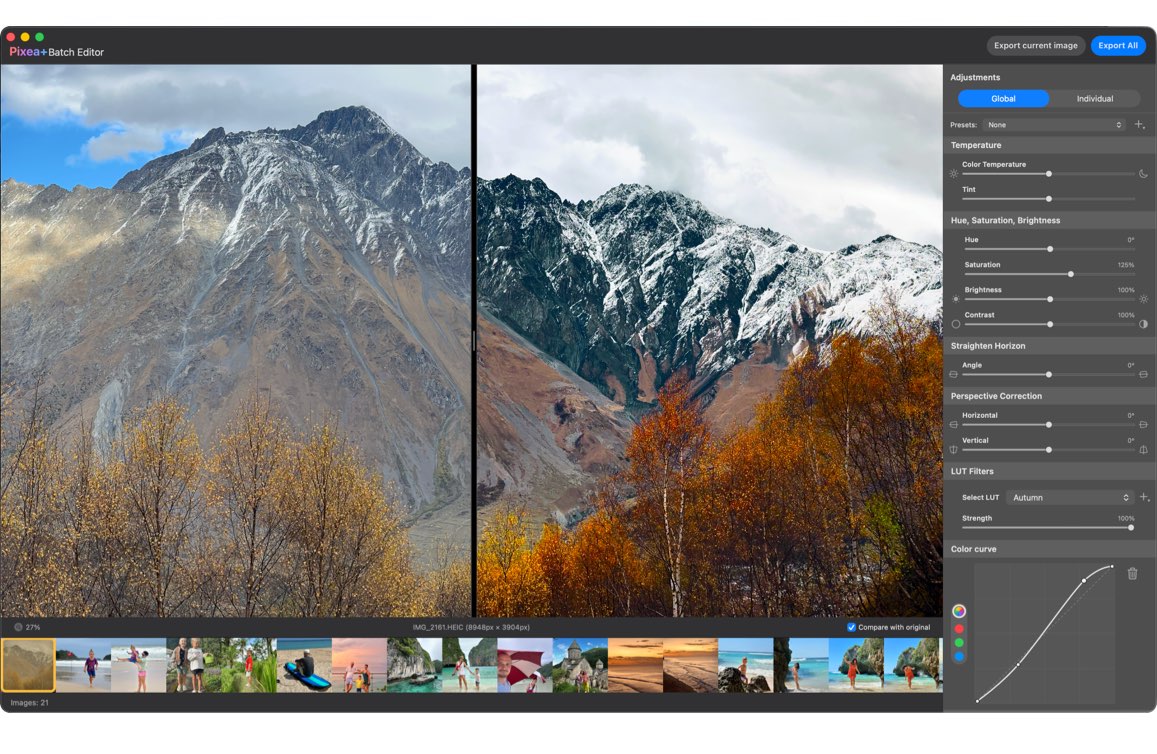
Apply image adjustments to a set of images
Process entire photo collections in one streamlined workflow. Apply adjustments globally for a consistent look, fine-tune individual images when needed, and save your favorite settings as reusable presets. Resize or upscale images, apply professional-grade edits, and convert batches into 10 export formats, including HEIC, AVIF, WebP, and JPEG XL. Whether you're refining a photo shoot or preparing images for the web, Pixea makes large-scale editing fast, flexible, and effortless.
Smarter Tools. Cleaner Results.
Remove any object from your photo in a few brush strokes
Use Object Removal Tool to remove unwanted objects, people, or defects. Pixea will reconstruct what was behind the object. It features great accuracy and high-resolution support to achieve amazing results.
Objects Removal is based on Machine Learning functionality first introduced with macOS Ventura. macOS 13 or higher is required.
2x and 4x upscaling powered by machine learning
Amazing 2x and 4x upscaling powered by machine learning. The algorithm is trained by analyzing millions of images. Sharpen and upscale a photo without losing its content. Unlike many competitors, Pixea's super-resolution technology supports images with alpha channel. Yes, you can upscale icons too!
Your Photos. Your Privacy.
Your privacy matters. Pixea processes your photos and performs image editing directly on your Mac. Your images stay on your device — never uploaded to external servers or shared with third parties. No cloud processing, no tracking of your photo library, and no compromise on your privacy. Just powerful editing tools, with complete control over your own images.
Supported Formats
Images
JPEG, HEIC, GIF, PNG, TIFF, JPEG XL, AVIF, Photoshop (PSD), BMP, Fax images, macOS and Windows icons, SCV sequences, Radiance images, and Google's WebP. RAW formats: Leica DNG and RAW, Sony ARW, Olympus ORF, Minolta MRW, Nikon NEF, Fuji RAF, Panasonic RW2, Canon CR2, CR3 and CRW, Hasselblad 3FR. Sketch files (preview only). ZIP archives, CBZ comic books.
Video
MP4, MOV, A4V, FLV, AVI, WMV, MPEG and MKV.
Export
JPEG, JPEG-2000, JPEG XL, WebP, AVIF, HEIC, PNG, TIFF, BMP, GIF.
Video Playback
Built-in Video Player with MP4 and MKV support
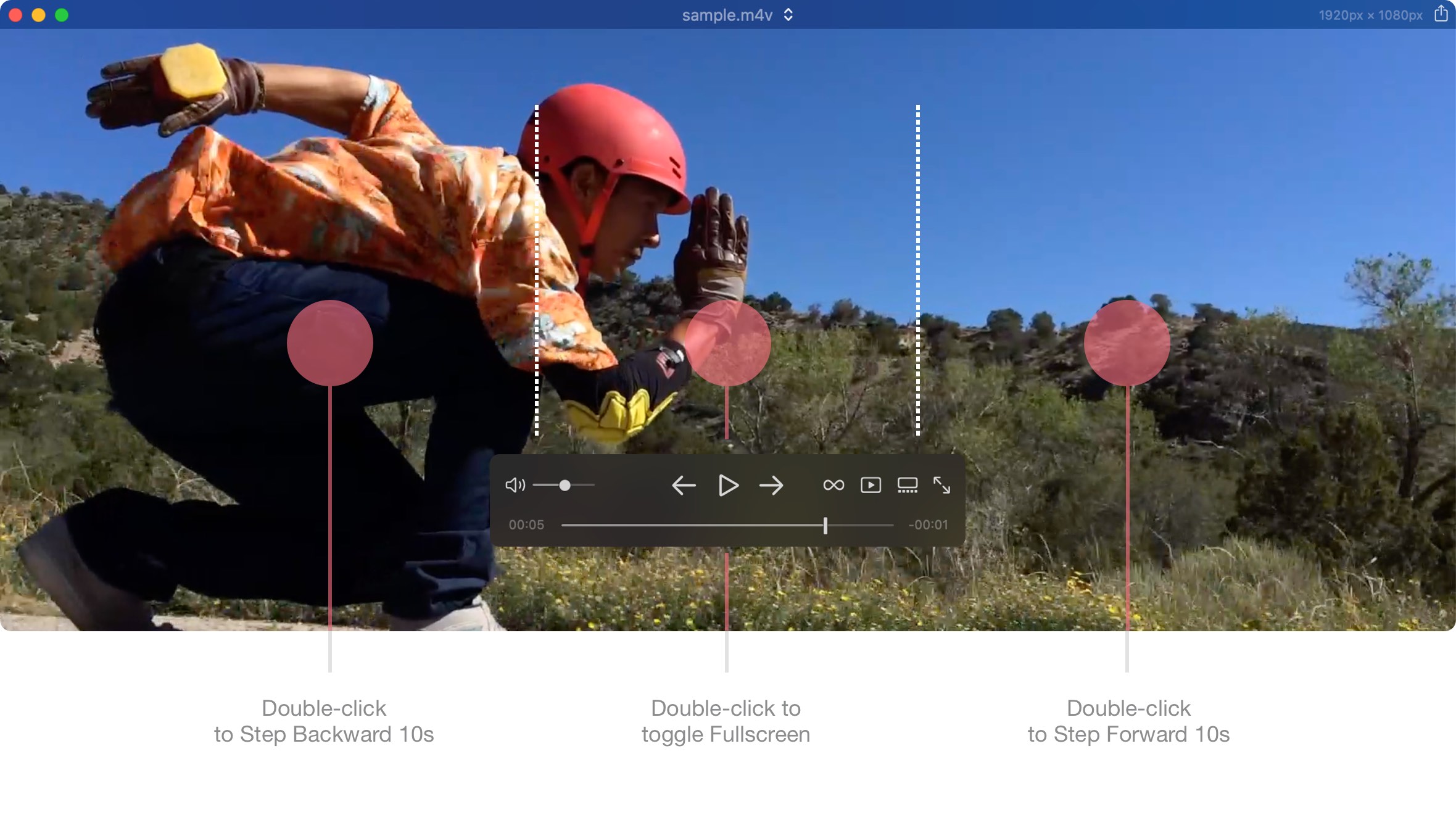
Audio tracks
Select audio track for your movie.
Subtitles
Select, hide subtitles while playing.
Play/Resume
Resume where you paused the movie.
Aspect Ratio
Change aspect ratio and size.
Repeat
Play Next, Play and Stop, and Repeat modes.
Playback speed
0.5x, 0.9x, Normal, 1.1x, 1.5x, 2x modes.
Pixea Plus
Enjoy more options, customizations and tools with Pixea Plus
Highlights
Actual Size
Set pixels or points
Keyboard Shortcuts
Customize any shortcut the way you want it
Thumbnails Panel
Set Size and Autohide options
4x Image Upscaling
Four times double the pixels using ML-powered algorithms
Trackpad Gestures
Customize swipe gesture for video playback
Status Bar
Status bar with resolution, date taken and other image properties
Object Removal Tool
Remove any object from your photo in a few brush strokes
Clone Tool
Clone pixels from another part of the photo
Sharpness and Noise Tool
Sharpen images and remove noise
Sorting
Sort media directories by name/type/size/date or shuffle
Searching
Search for images or videos in media directories or Zip-archives
Fitering
Filter media files by type or metadata
Batch Editing
Apply image adjustments to a set of images with global and per-image settings
Image Adjustments
Perspective correction, Color curves, HSL by color channel, Watermark, and other Pixea Plus tools
Pixea Free vs Pixea Plus: Feature breakdown
| Pixea Free | Pixea Plus | |
|---|---|---|
| Image formats and core features | ||
| All supported Image and Video formats | ||
| All supported export formats | ||
| Media browser | ||
| Slideshows | ||
| Group actions | ||
| Theatre mode | ||
| Similar images/duplicates search | ||
| Batch editing | 3 images only | No limit |
| Filtering | by Type only | by Type/Rating/Label |
| Searching | - | |
| Sorting | - | |
| On-screen display | - | |
| Status bar | - | |
| Options and customizations | ||
| Zooming options | ||
| Ignore hierarchy | ||
| Actual size | Pixels | Pixels/Points |
| Image filtering | Linear only | Linear/Trilinear/Lanczos |
| Thumbnail panel customizations | - | |
| Keyboard shortcuts | - | |
| Swipe gestures | - | |
| Image adjustment tools | ||
| Crop/Rotate/Copy | ||
| Reshape | ||
| Hue, Saturation, and Brightness | ||
| Exposure | ||
| Brilliance | ||
| Clarity | ||
| Color temperature | ||
| Straighten horizon | ||
| Focus/depth of field/Lens blur | ||
| Masks: essentials | ||
| Lens distortion | - | |
| Vignette | - | |
| Upscaling | 2x only | 2x/4x, details setting |
| Masks: color | - | |
| Masks: hue, saturation, brightness | - | |
| Depth-aware dehaze | - | |
| Depth-aware exposure | - | |
| Depth-aware temperature | - | |
| Depth-aware saturation | - | |
| Depth-aware brilliance | - | |
| Depth-aware vibrance | - | |
| Objects removal | - | |
| Clone | - | |
| Hue, Saturation, and Brightness per selected color | - | |
| LUT filters | - | |
| Color curves | - | |
| Perspective correction | - | |
| Image overlay | - | |
| Watermark | - | |
| Noise/Sharpness | - | |
Pixea Plus subscription helps us to support Pixea and add even more free features with every release.
Ratings and Reviews
4.7
based on 5000+ AppStore reviews
System Requirements
macOS 11 or higher. Native Apple Silicon and Intel based Macs support.

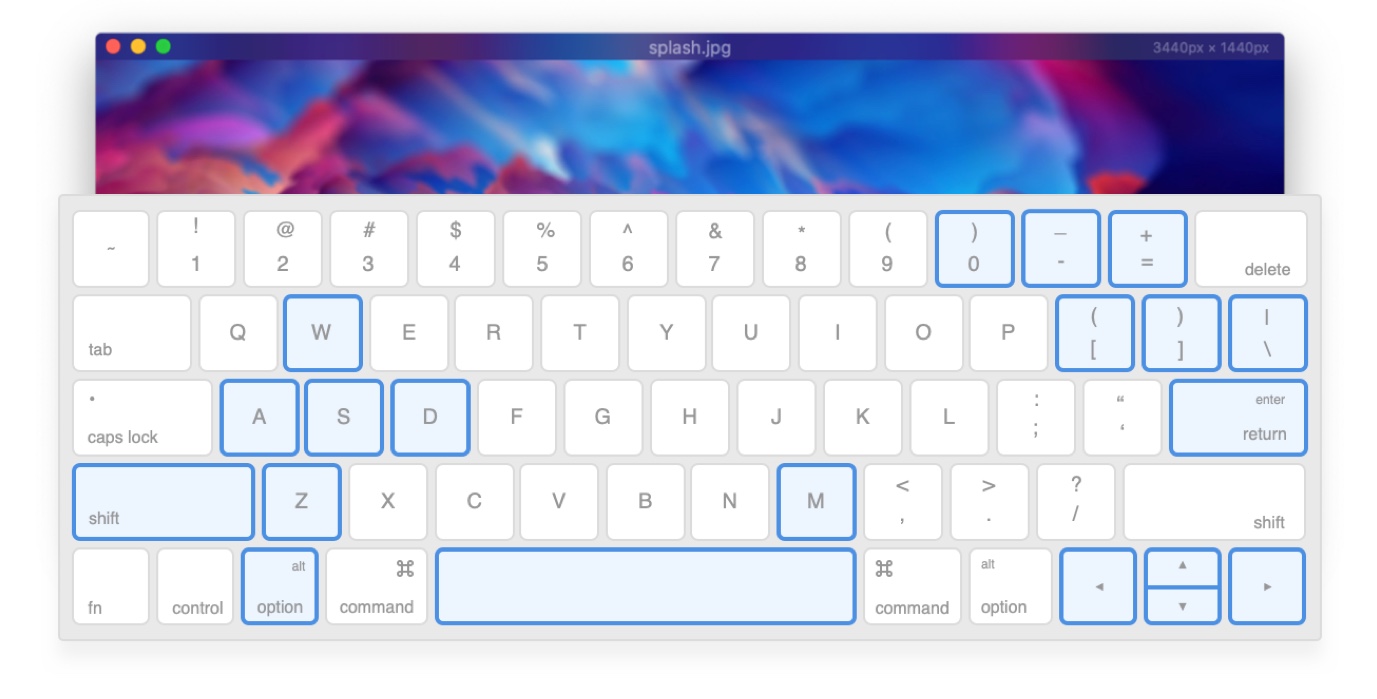
Keyboard Shortcuts
- Scroll: W, A, S, D
- Zoom In: Z + Mouse Click
- Zoom Out: Z + Option + Mouse Click
- Selection Tool: M
- Square Selection: Hold Shift
- Scroll: Hold Spacebar + Drag
- Previous / Next Image: ← ⁄ →
- Previous / Next Image Frame: ↑ ⁄ ↓
- Zoom In / Zoom Out: + ⁄ -
- Slideshow: Enter
- Rotate Image Left / Right: [ ⁄ ]
- Fit to Screen: \
- Actual Size: 0
Questions? Answers.
How does Pixea compare to Adobe Lightroom?
Pixea offers a powerful alternative to Lightroom for photographers who want advanced editing tools in a fast, native macOS app. With depth-aware adjustments, selective masking, LUT support, batch processing, and a versatile image viewer, Pixea brings viewing and editing into one streamlined workflow. The two apps have different strengths, so the best choice depends on your needs and working style.
Adobe, Adobe Lightroom are registered trademarks of Adobe Corporation.
Are my photos private? Does Pixea use cloud processing?
Pixea processes images locally on your Mac, without uploading them to cloud servers for editing. Your photos remain on your device during the editing workflow, so you can work on personal projects and professional shoots without relying on cloud-based image processing.
What makes Pixea's depth-aware editing different?
Pixea lets you adjust different depth regions of a photo independently. Change the brightness or color of a foreground subject without affecting the background, enhance distant scenery, or create natural depth-of-field effects. Instead of manually drawing complex masks, you can use depth information to make targeted adjustments in fewer steps.
How to brighten a dark subject without overexposing the background?
In this tutorial, we explore two ways to fix a dark subject in Pixea: depth-aware adjustments and masks.
How to remove haze from landscape photos with depth-aware dehaze?
In this tutorial, we explain how spatial dehaze works, how it differs from conventional dehaze, and how to use it to restore clarity while preserving the natural atmosphere of a landscape.
How to change the default image viewer on Mac?
Select an image file you want to open with Pixea. Hit "Command + I" on your keyboard or right click on the file, and select Get Info.
Under the "Open With" dropdown menu, select "Pixea". Click "Change All" to apply settings to all images with the same type. You might have to repeat the process with different image types.
Related articles: How to change the default Mac app for specific image types?
Pixea Support
Found a bug? Have a suggestion? Please, send it to support@imagetasks.com or reach us on X at @imagetasks.
More Apps by ImageTasks
System Monitor
Reinvented